The counter app for work in progress
For any counter that takes a job in and hands it back later.
- Dry cleaners
- Repairers
- Tailors
- Key cutters
- Opticians
- Restaurants & takeaways
No card needed. Three months free, then from £49 per shop, per month, plus VAT.
or look round the live demo
- Built and tried at real shop counters
- UK-hosted
- ICO registered (ZC271062)
- Company no. 17495692
- Works with Epos Now
The problem
“Is it ready yet?”
Forty times a day. The paper job book has two handwriting styles in it and nobody can read either. The bag on the shelf has no ticket, or a ticket with a number that matches nothing. The customer rings on Saturday because nobody told them the work was done on Thursday.
And the same sale is written in the book, typed into the till, then copied into a spreadsheet on Sunday. Finding out whether a job is ready should not take four minutes and two people.
How it works
The counter, end to end
One job, one ticket number, one record. Everyone in the shop sees the same thing at the same time, including what used to live on a paper ticket.
-
Take the job
Customer, items, prices and a due date, entered at the counter in seconds. A label with a scannable number prints on the spot and goes on the bag.
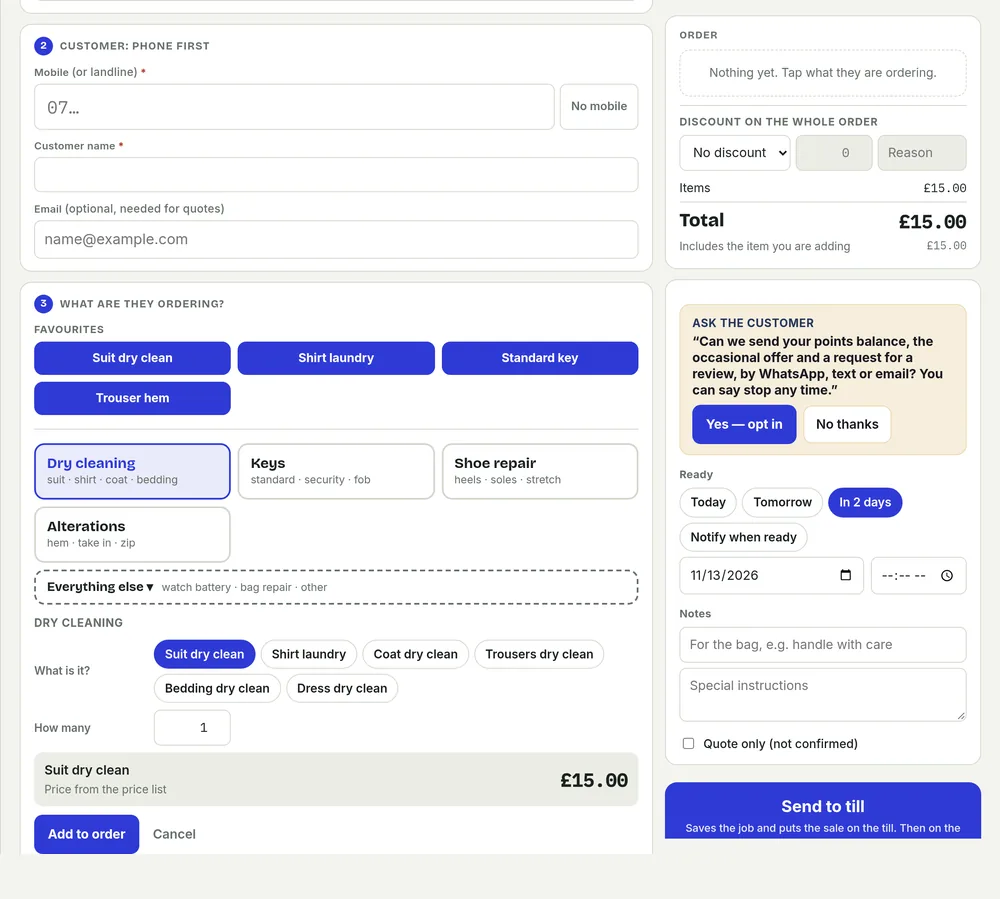
A new job at the counter: the common jobs are taps, not typing, and the price builds as you go. -
Ring it up once
On an Epos Now till, saving the job sends the sale to it as an open order, so nobody types it in twice. On any other till, the sale is rung up exactly as it is today.
-
Do the work
The job sits in Pending until the work is done. The shelf list shows what is due and what is already overdue.
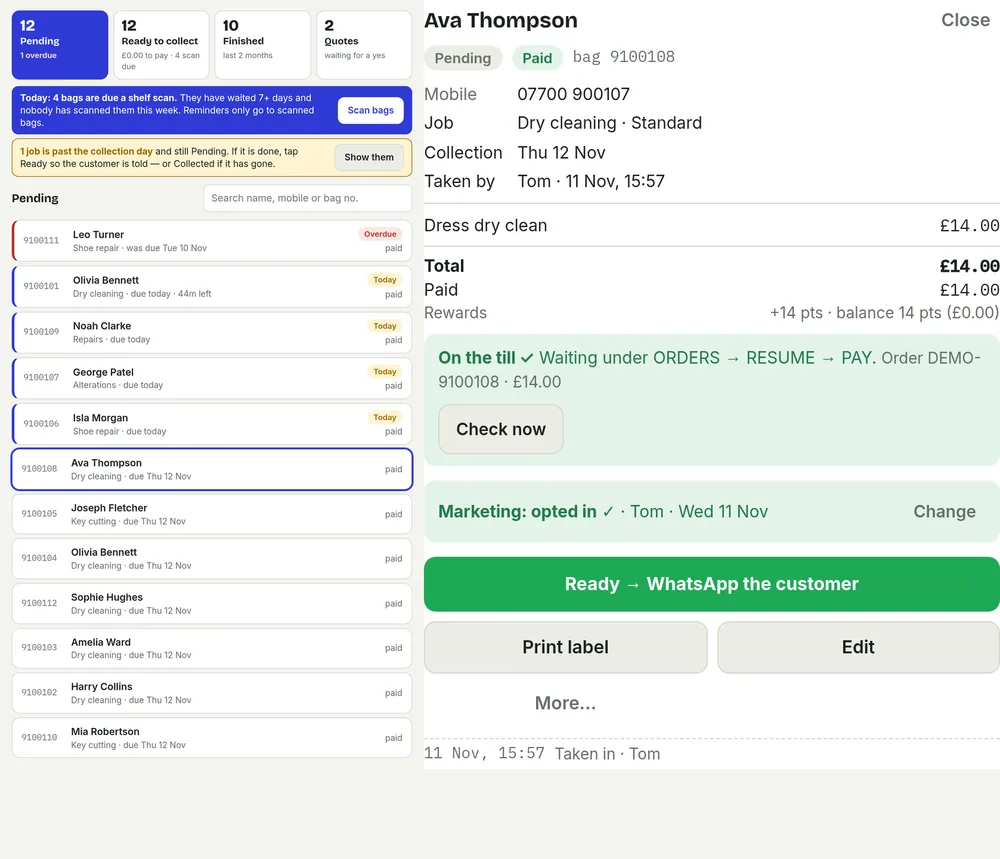
An open job keeps its own record: what was taken in, what it costs, and who did what. -
Ready, and told
Mark it Ready and the customer gets a WhatsApp, text or email. Still uncollected a few days later and they hear from you again.
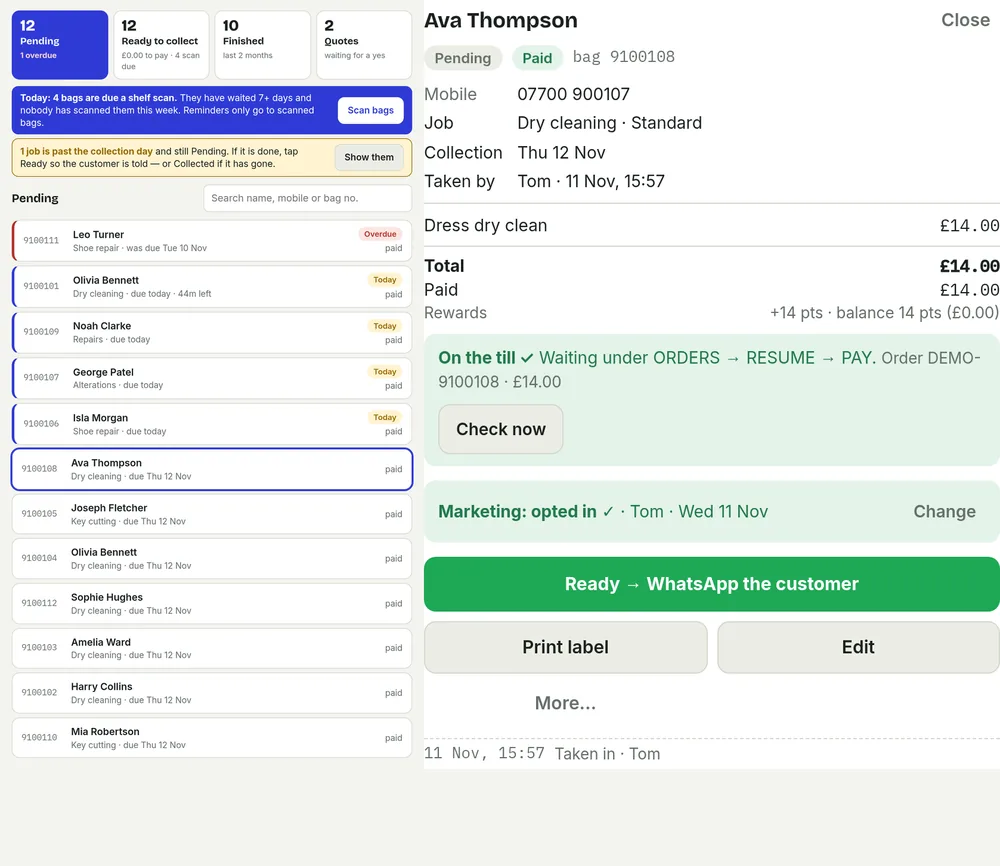
One green button marks it ready and sends the message from the shop’s own number. -
Collected
Scan the label, take payment on the till and close the job. The shelf stays honest, even on a busy Saturday.
The idea
One job, one number
The ticket number is the whole idea. It is printed on the label when the job comes in, it stays on the bag through the work, and it is the number the till uses when the customer collects. Nothing is copied from a paper book into a screen, and nothing is typed twice.
So there is one place to look, not the book, the till and the shelf list arguing with each other. One record, one status, the same answer whoever you ask.
And you can count what is in, what is due, what is overdue and what is waiting, without walking the shelf with a clipboard.
The till
Will it work with my till?
Already on Epos Now? The job is pushed to the till as an open order, so you ring it up once. The customer, the bag number and the order arrive with the sale.
On any other till, nothing changes. CounterPal runs the jobs and the messages, and the sale is rung up exactly as it is today. No new hardware.
Price
Three plans. Three months free.
Starter
£49
per shop, per month, plus VAT
3 months free. No card needed.
- Job board: pending, ready and collected
- 200 texts a month
- Unlimited email (fair use)
- Labels and bag numbers
- Staff sign-in and PINs
- A default “order ready” message
- Email support
- Self-serve billing, invoices and cancel Coming soon
- Data export Coming soon
Priced per shop.
Most popular
Plus
£79
per shop, per month, plus VAT
3 months free. No card needed.
- Everything in Starter
- 400 texts a month
- Reminder and review-request messages
- Editable message templates
- SMS usage in Settings Coming soon
- In-app checklist Coming soon
- Book a help call Coming soon
Priced per shop.
Pro
£99
per shop, per month, plus VAT
3 months free. No card needed.
- Everything in Plus
- 800 texts a month
- WhatsApp “order ready” Coming soon
- Add a second shop yourself Coming soon
Priced per shop.
Email is unlimited for messages about your own customers’ orders, subject to fair use. Starter includes 200 texts a month, Plus 400, Pro 800.
Why not pay once?
Posso charges £499 plus VAT and EposDirect £399 plus VAT, once. Real prices, honestly stated.
A licence does not cover what comes after the install: hosting in London, backups, messages, updates, and someone to ring when the shelf list will not load. That is what the month pays for. No server in the back room, no upgrade to buy.
Starter is £49 a month, which is £588 in year one. An hour a week saved covers it, and you can stop.
The three months are free and need no card. If it is not right for your counter after that, tell me and we will close the account.— Ivan, CounterPal
Built at the counter
Built at a counter, not in a lab
CounterPal is written by people who run a counter. It started with a paper job book with two handwriting styles in it, no way to tell what was on the shelf, and a Saturday queue that does not wait while somebody finds a pen.
Every feature here exists because a member of staff needed it during a shift, and every change is tried on a real Saturday before it ships. When something breaks at nine on a Monday, we hear it from the counter, not from a support ticket.
Have a look before you talk to anyone. The demo is the same app, with sample jobs in it.
Look round the live demoOpens in a new tab
Where it was built
Built at the counter
CounterPal was built at real shop counters. They cover a full counter’s day — work taken in, work on the shelf, money taken, and customers asking where their job has got to.
We will not dress up a small number of shops as a big one. It is places where the app has to work on a busy Saturday, and where the person who wrote it hears about it when it did not.
Questions
The things shops ask first
Will it work for my kind of shop?
If your business takes a job in and hands it back later, it fits: dry cleaning, repairs, alterations, keys, tailoring, opticians and restaurants. The demo is the fastest way to see it.
Does it work with my till?
If you use Epos Now, yes: a new job is pushed to the till as an open order, so the sale is rung up once. On any other till, CounterPal works as normal and the sale is rung up exactly as it is today.
What happens after the 3 months?
It carries on at the plan you chose: £49, £79 or £99 per shop, per month, plus VAT. We will talk to you before the free months are up, and nothing happens if you would rather stop.
How many texts are included?
Starter includes 200 texts a month, Plus 400, and Pro 800. Email is unlimited on every plan, subject to fair use.
Do I need to change my WhatsApp number?
Ready messages go by email and text today. WhatsApp “order ready” is coming soon on Pro. When it does, messages will go from the shop's own WhatsApp Business account, so customers see the number they already know.
Can I use it in more than one shop?
Yes. Pricing is per shop, on the plan you choose, after the free months. Send us a message with the shop names and we will set them up together. Adding a second shop yourself is coming soon on Pro.
Is there a one-off price instead of monthly?
No. A one-off licence like Posso at £499 plus VAT or EposDirect at £399 plus VAT buys the software once. The monthly price also pays for hosting in London, backups, messages, updates and support.
What if my staff won't use it?
Then it is the wrong app for that counter, however good it looks in a demo. CounterPal is built to be learned in an afternoon: three states, one label, one green button. If the shop has not settled into it, tell us and we will help you get your jobs out and close the account.
What happens to my customers' data?
The shop is the data controller and CounterPal Limited is its processor: we use the data only to run the app for the shop, on its instructions, never for our own purposes. Your customers can ask for their data to be deleted at any time on our data deletion page.
How do I cancel?
Email ivan@counterpal.co.uk or use the contact form and we will stop the account. We will help you export the shop's data and then delete it.
Is my data in the UK or the EU?
Shop data, sign-ins, files and backups are stored in London. Some support work and the website cache can sit outside the UK; our privacy policy sets out who handles what and where.
3 months free
Set up your three free months
Three months free, then from £49 per shop, per month, plus VAT. No card needed.
Thanks, we've got your details
This is a request, not an account yet. We'll email you within one working day to set your shop up.
Try the demo while you waitTalk to us
Questions about CounterPal?
A reply from a person, not a bot, usually the same working day. Ask about anything. Or write to ivan@counterpal.co.uk.
Message sent
Thank you. We will reply to your email within one working day.